
Configure custom products. Generate fabrication-ready CAD automatically.
Cadxor turns your approved components and engineering rules into a web configurator. Every valid configuration becomes a 3D model, a fabrication drawing, an approval record and ERP-ready data — without anyone reopening CAD.
For manufacturers and fabricators with engineered-to-order and configure-to-order product lines.
- Tube
- —
- Overall
- —
- Approval
- —
Your team already knows how to build it. It still gets engineered from scratch every time.
A customer asks for a different length, flange, material or arrangement of a product you already make. What follows is the same loop, every time, on every order:
Cadxor converts that repeatable engineering logic into software. Your engineers define the components and the rules once. After that, every valid configuration produces its own engineering package — and the ones that need a human decision are routed to the right person with the context to make it.
One controlled path from configuration to the shop floor.
Configure
Pick from compatible, released components. Enter dimensions within allowed ranges.
Validate
Connection, dimension, material and customer rules run on every change.
Generate CAD
The CAD worker assembles the approved STEP parts by their connector geometry.
Route approval
Non-standard requests go to engineering, purchasing, sales or the customer.
Fabrication package
STEP, PDF drawing, DXF, BOM and configuration record, versioned together.
Sync ERP
Items, BOMs, quotes and orders pushed to your ERP with idempotent, logged syncs.
Not a picture of a product. The drawing your shop builds from.
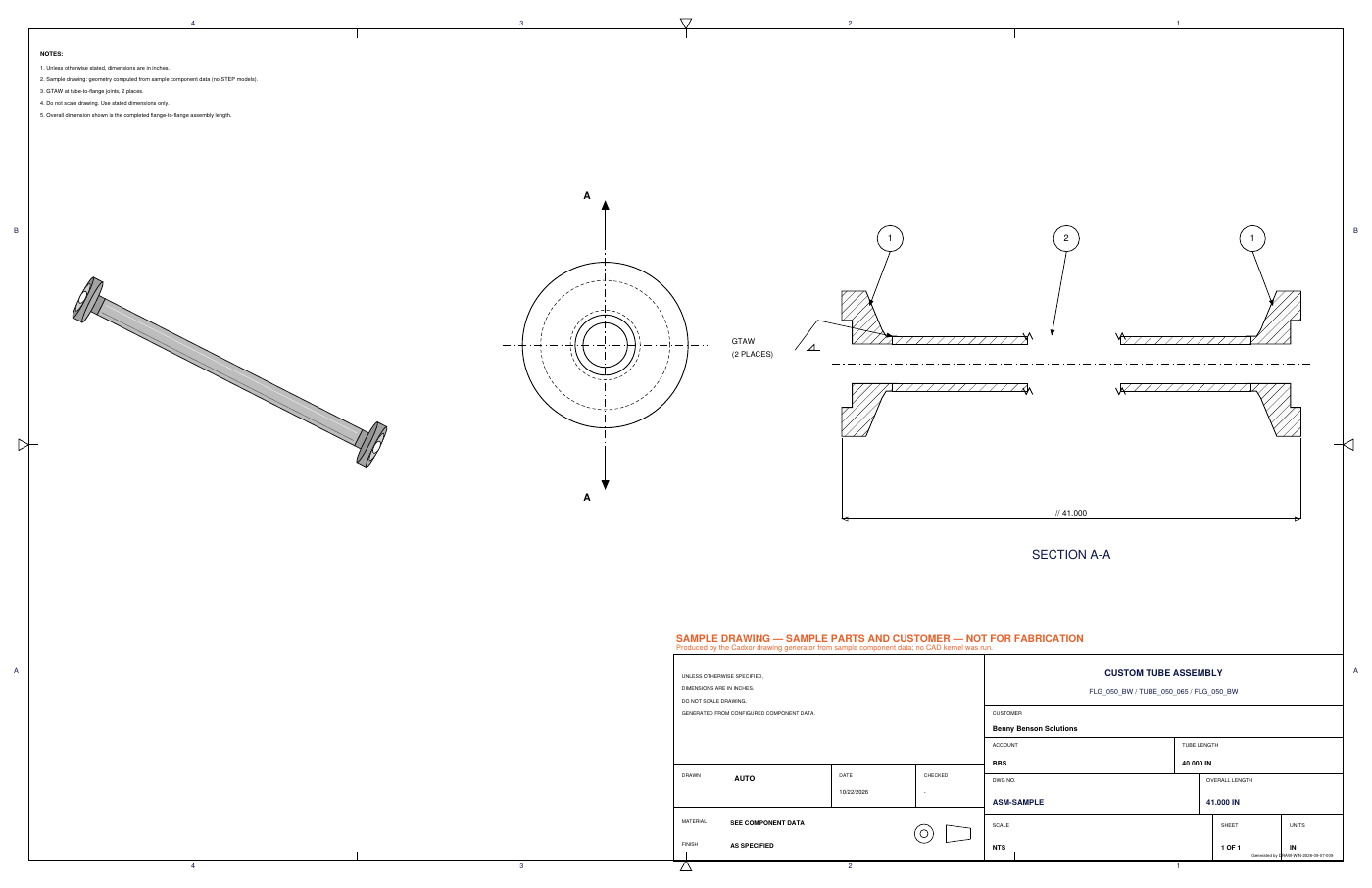
Cadxor's CAD worker runs a real geometry kernel. It loads the approved STEP components, positions them by their mating connectors, fuses the assembly and measures the result — so the overall length on the drawing comes from the model, not from arithmetic in a spreadsheet.
- ANSI fabrication sheet with isometric, end view and Section A-A
- Weld callouts pointed at the joint, customer and job in the title block
- STEP assembly, PDF and DXF on every job; DWG and Autodesk Inventor IPT/IAM where licensed
- Every file tied to the exact configuration and component revisions that produced it
Everything between the request and the router.
Visual product configuration
Dimensional input and compatible-part selection with a live 3D preview.
Automated CAD generation
Repeatable STEP assemblies built from your approved engineering components.
Fabrication drawings
Standardised drawings and manufacturing documentation, generated per job.
Rule-based engineering
Manufacturing constraints as data, so impossible configurations never reach the shop floor.
Approval routing
Engineering, purchasing, sales, quality, manufacturing and customer approvals by rule.
ERP integration
Configured items, BOMs, drawings, quotes and orders into the ERP you already run.
API & webhooks
Embed configuration in your website, portal, CRM or ERP workflows.
Revision control
Released configurations are immutable. Changes create a new revision with its own approvals.
Customer portals
Let customers and distributors configure approved products without unrestricted engineering tools.
Quote automation
Valid configurations become structured quoting inputs and estimates.
Component libraries
Approved CAD parts with revisions, connection geometry and manufacturing metadata.
Audit history
Configuration, approval, generation, download and integration events — tamper-evident.
Built for the products you already make, on the systems you already run.
- Fabrication-ready CAD, not just visuals.
- Many configurators stop at a rendered image and a price. Cadxor produces the model and drawing the shop needs.
- Your components, your connector geometry.
- Your approved library stays yours. Cadxor stores how parts connect — origin, axis, diameter, insertion depth — not fragile face IDs.
- Keeps your CAD and ERP.
- The CAD worker runs on a Windows machine you control, alongside FreeCAD or Autodesk Inventor. ERP stays the system of record.
- Engineering stays in control.
- Rules decide what is standard. Everything else is routed, approved and recorded against the exact version approved.
- Sized for mid-market implementation.
- Start with one product family in weeks, not a multi-year enterprise programme.
Browsers never talk to the CAD machine. The worker makes outbound calls only, so it needs no open inbound ports.
Manufacturers with repeatable products and custom requests.
Cadxor is built first for companies with roughly 10–500 employees, an internal engineering team, existing CAD libraries, an ERP, and salespeople who depend on engineering for every variation.
Vacuum & sanitary tubing
Flanged and fitted tube assemblies with cut-length, end and material choices.
Pipe, hose & ducting
Runs and spools assembled from standard fittings and parametric sections.
Frames & structures
Extrusion, tube and structural frames with standard connectors and brackets.
Equipment & enclosures
Modular machines, conveyors, manifolds and enclosures with option sets.
How much engineering capacity is tied up in variants?
Enter your own numbers — custom configurations per month, hours each, labour cost — and see an estimate of the time Cadxor could return to your engineering team. The calculator shows its assumptions and every result is an estimate, not a promise.
Open the ROI estimatorSee Cadxor with your own product family.
Bring one configurable product line. We will map its components and rules and show you the generated package.